
How to Protect Your OS and Browser from Zero-Day Attacks
A zero-day attack exploits a previously unknown vulnerability in software, hardware, or firmware before a fix is available. These attacks can target operating systems and web browsers, potentially putting your data, privacy, and device security at risk. While zero-day threats are difficult to prevent completely, keeping your OS and browser updated, using reliable security tools, and practicing safe browsing can reduce your risk.
What is a Zero-Day Attack?
A zero-day attack occurs when hackers exploit a previously unknown software, hardware, or firmware vulnerability. Because the vulnerability has yet to be discovered by the vendor, no patches or fixes are available, making it particularly dangerous.
Zero-day attacks can lead to significant data breaches, financial loss, and damage to an organization’s reputation.
Zero-Day Attack vs Zero-Day Exploits

While zero-day attacks and exploits are often used interchangeably, they refer to different aspects of the threat. A zero-day exploit is the method or technique used to exploit the vulnerability. In contrast, a zero-day attack uses that exploit to infiltrate a system.
The Zero-Day Attack Timeline
- Discovery: A hacker discovers Software, hardware, or firmware vulnerabilities.
- Development: The hacker develops an exploit to take advantage of the vulnerability.
- Attack: The exploit is used to launch an attack, potentially causing widespread damage.
- Disclosure: The vendor becomes aware of the vulnerability, either through the attack or by other means.
- Patch Release: The vendor develops and releases a patch to fix the vulnerability.
- Mitigation: Users apply the patch to protect their systems from future attacks.
Systems Targeted by Zero-Day Attacks
Zero-day attacks can target various systems, including:
- Operating Systems: Windows, macOS, Linux, and other operating systems are common targets due to their widespread use.
- Hardware: Components such as CPUs, GPUs, and network devices can also be vulnerable.
- Web Browsers: Browsers like Chrome, Firefox, Edge, and Safari are frequently targeted because they are gateways to the internet.
- Internet of Things (IoT): Devices like smart home systems, wearables, and connected appliances are increasingly at risk.
- Office Applications: Programs like Microsoft Office and Google Workspace are often targeted to access sensitive information.
Best Practices for Protection Against Zero-Day Attacks

- Keep Software Updated: Regularly update your OS, applications, and firmware to ensure you have the latest security patches.
- Use Comprehensive Security Solutions: Employ antivirus, anti-malware, and endpoint protection software to detect and mitigate threats.
- Practice Safe Browsing: Avoid clicking suspicious links or downloading files from untrusted sources.
- Network Security: Protect your network using firewalls, intrusion detection systems, and encrypted connections.
- Employee Training: Educate employees about phishing and other common attack vectors to reduce the risk of human error.
Zero-Day Attack Protection with Fortect
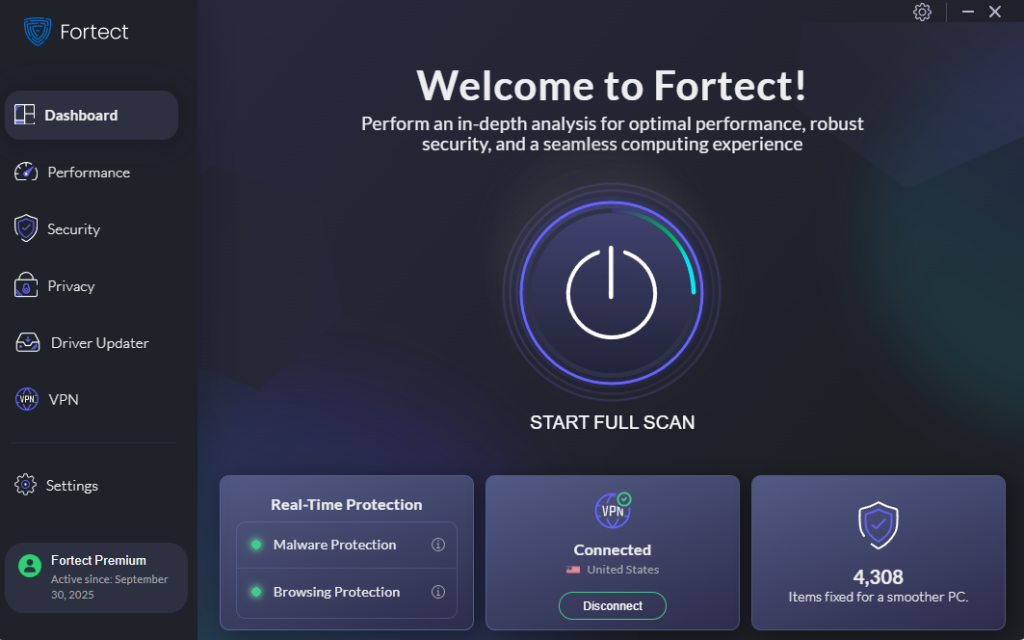
To enhance your protection against zero-day attacks, consider using Fortect. Fortect is an all-in-one solution designed to safeguard your system and repair damage caused by various threats.
The new Fortect Premium now includes a built-in VPN with Auto-Protect on public Wi-Fi, ensuring your connection stays secure even on open networks. It encrypts your internet traffic to keep your data private and shield you from hackers who exploit unsecured connections, a common entry point for zero-day attacks and other network-based threats.
Fortect is a comprehensive system utility that repairs virus and malware damage, resolves freezing and crashes, monitors hardware performance for potential issues, continuously scans for and removes malware threats, and quarantines any detected threats to repair damage and restore optimal system performance.
Fortect Browsing Protection also safeguards your online browsing against malicious sites and threats. To install it on Chrome, search for it in the Chrome Web Store and add the extension.
During installation, you’ll be prompted to enter your email and password to scan for any possible browser threats. Just provide the information asked, and you’re good to go. You’re just setting up your security account like the image below.
To ensure your system remains protected from zero-day attacks and other threats, download and install Fortect today for complete repair and protection.
Don’t wait until it’s too late, download and install Fortect now and fortify your digital defenses.
Conclusion
Zero-day attacks are a significant threat to the security of your OS and browser. Understanding these attacks and implementing best practices can significantly reduce your risk. A robust security solution further enhances your protection, ensuring your system remains secure and resilient against these advanced threats.
Windows 10 and 11 Updated September 2026. Originally published May 2024




